

Descripción
Optimal State is a complete performance suite that does it all: database optimization, automated backups, page caching, brute force protection, 2FA, search & replace, and advanced cleanup. All in one lightweight plugin.
Why pay for 4-6 separate plugins? Optimal State replaces WP Rocket, UpdraftPlus, WP‑Optimize, Perfmatters, Better Search Replace, Loginizer and more — saving you money, reducing conflicts, and simplifying your workflow.
▶ Live Interactive Demo | 📕 User Manual
What Makes Optimal State Different?
🚀 All‑in‑One, Not a Collection of Features
Unlike plugins that bolt on random features, Optimal State is engineered as a unified performance system. Every component works together, not against each other.
💰 Replace 6+ Premium Plugins
Stop paying for multiple subscriptions. Get everything you need in one plugin:
- UpdraftPlus Database backup & restore (with safety rollback)
- WP Rocket Page caching, browser caching, performance tweaks
- WP‑Optimize Database cleanup, table optimization, autoload optimization
- Better Search Replace Serialization‑safe search & replace
- Perfmatters Heartbeat control, emoji removal, header cleanup
- Loginizer Brute force protection, IP blocking
- Plus 2FA, legacy plugin scanner, integrity scanner, index manager
🔬 Built on Real Database Science
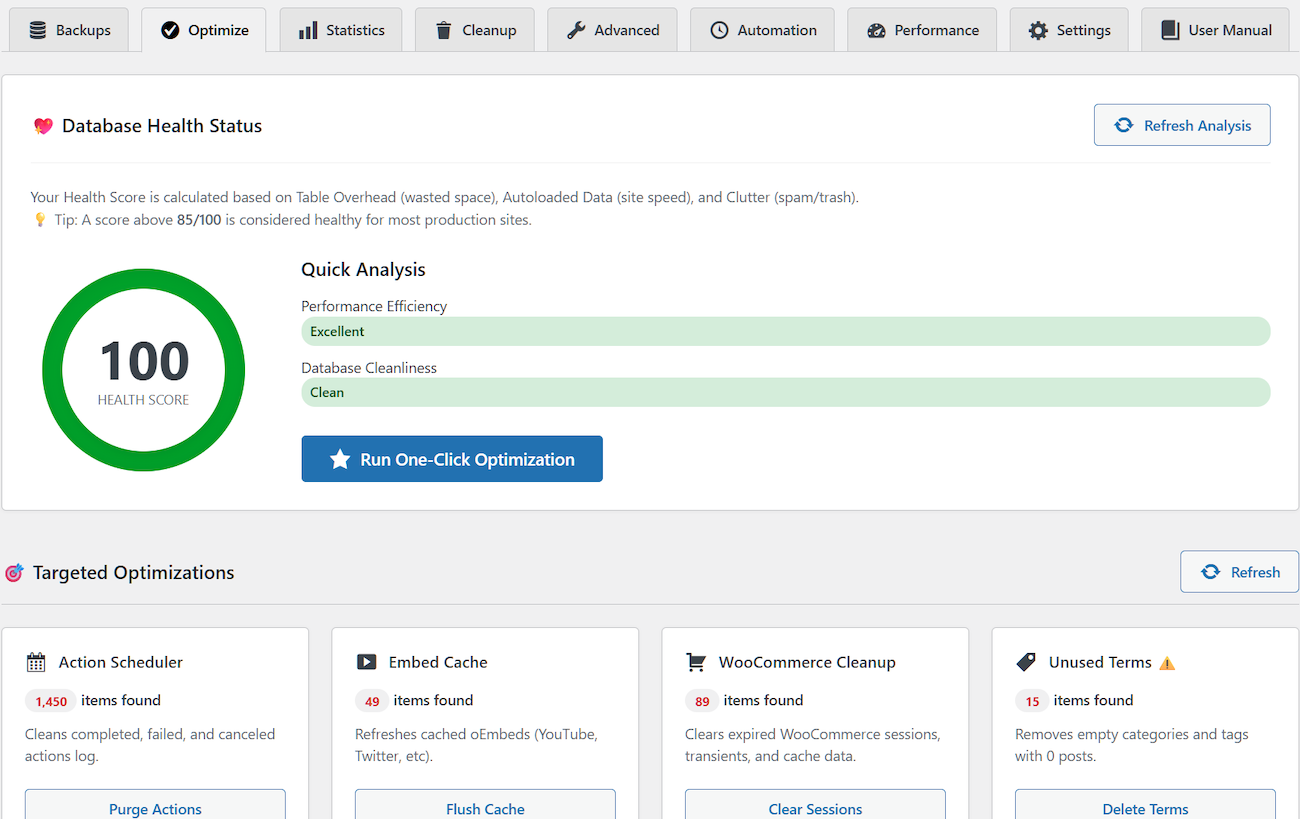
Our proprietary health scoring algorithm (0–100) analyzes 3 key areas: Performance (40%), Cleanliness (35%), and Efficiency (25%). It tells you exactly what to fix and when.
🛡️ Enterprise‑Grade Safety
Every destructive operation includes:
– Automatic safety backup
– Emergency rollback system
– Zero‑downtime restore (temp table swap)
– Database validation before restore
– Maintenance mode during critical ops
What You Can Do With Optimal State
🗄️ Database Optimization
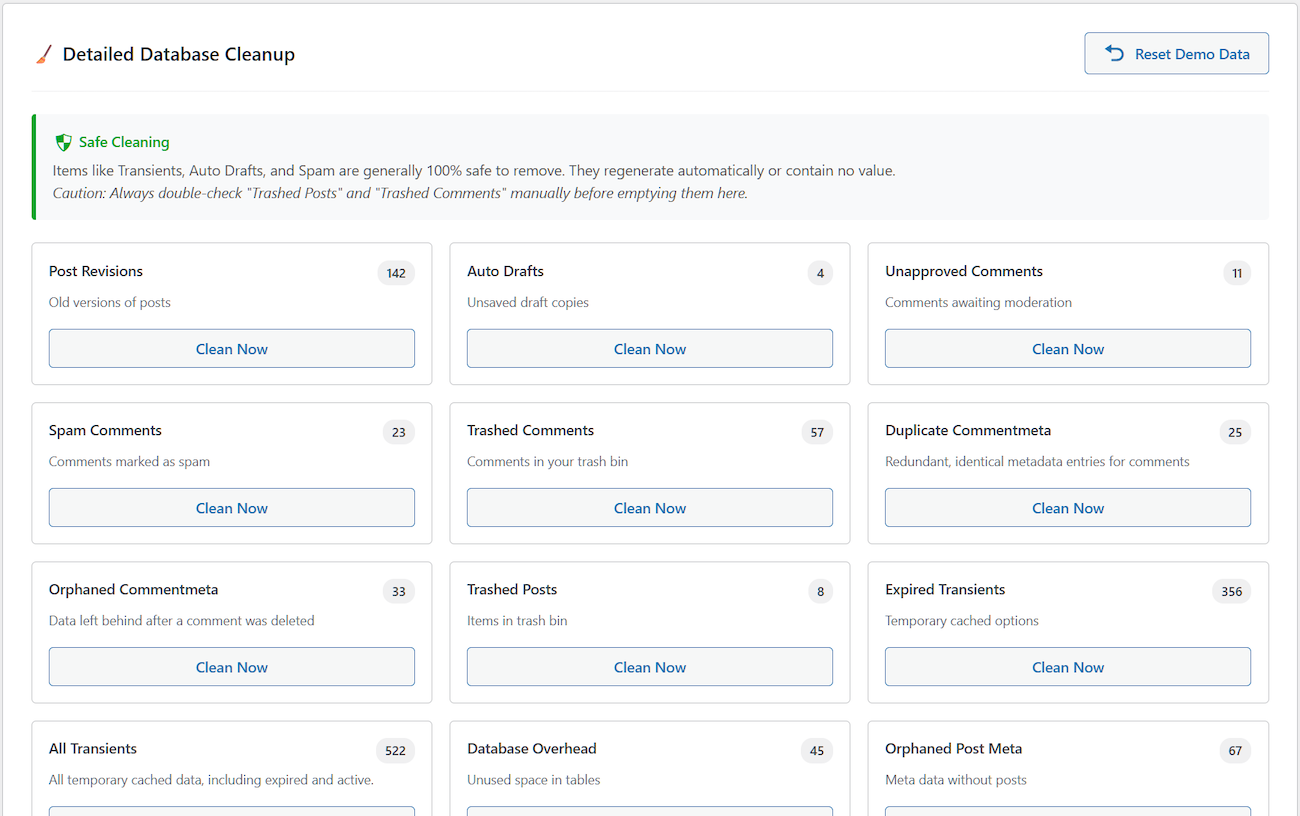
– One‑click optimization cleans 20 types of database bloat in seconds
– Real‑time health score (0‑100) shows your database condition at a glance
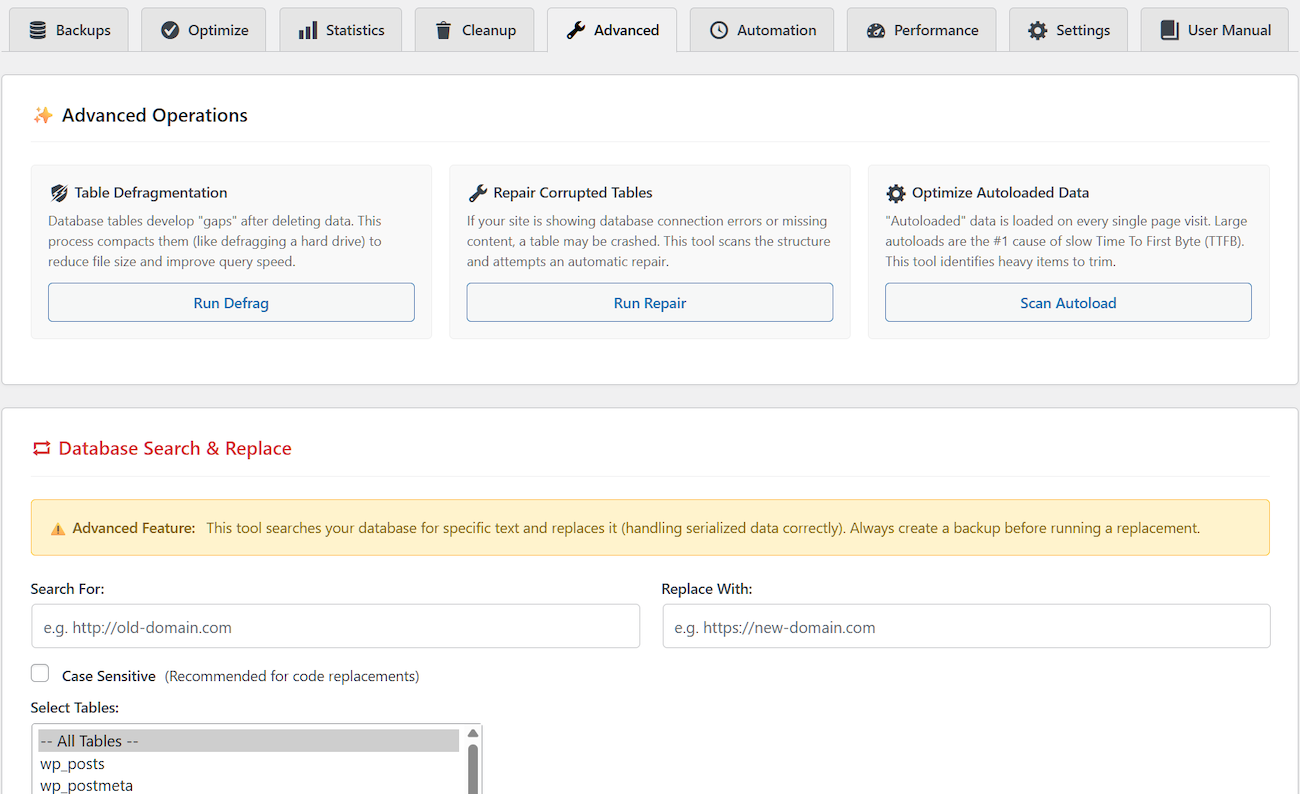
– Table defragmentation recovers wasted disk space
– Autoload optimization speeds up every page load (critical for TTFB)
– Table repair fixes corrupted tables automatically
– Legacy plugin scanner removes ghost data from uninstalled plugins
– Delete unused tables safely (with protection for active plugins)
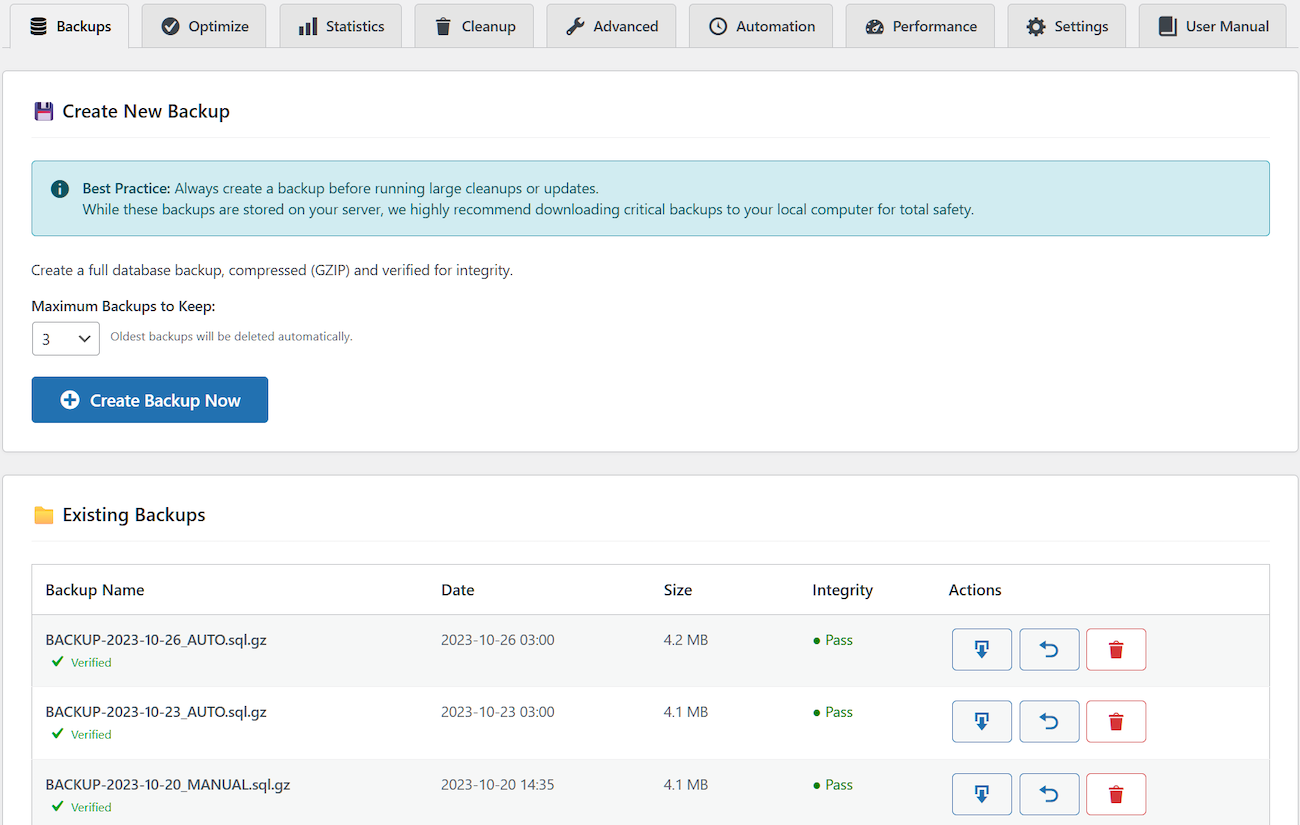
💾 Backup & Restore
– Create GZIP‑compressed database backups with integrity checksums
– Restore any backup with automatic safety rollback
– Keep up to 10 backups with automatic rotation
– Upload and restore external backups (up to 5GB)
– Zero‑downtime restore using temporary table technology
– Protected backup directory prevents unauthorized access
⚡ Caching System
– Server‑side page caching delivers lightning‑fast HTML
– Browser caching with automatic .htaccess rules (Apache)
– Database query caching for Redis/Memcached
– Mobile‑specific cache for separate mobile layouts
– Smart cache preload from sitemap
– GDPR‑compliant cookie detection (supports 20+ consent plugins)
– Intelligent auto‑purge on content updates
🔍 Search & Replace
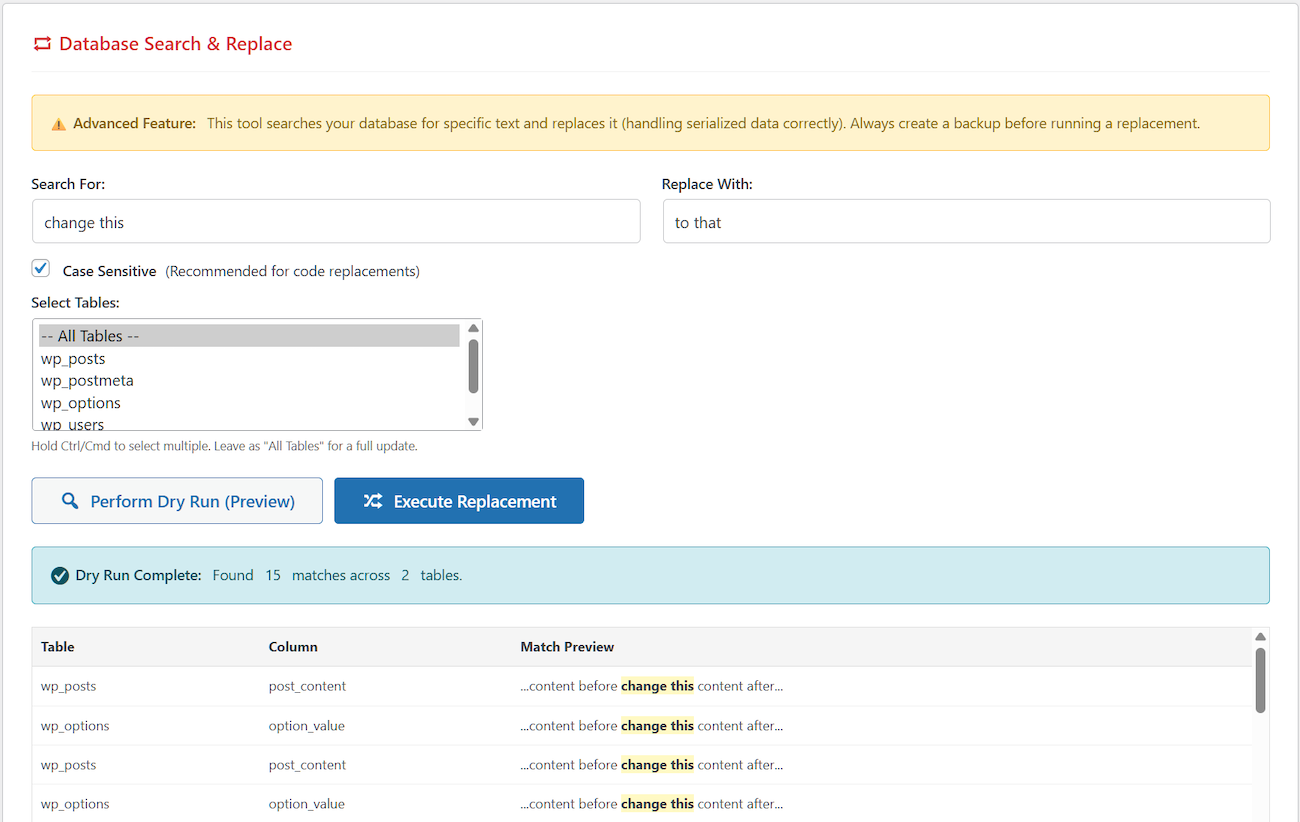
– Serialization‑safe — handles PHP serialized data correctly
– Dry run mode previews all changes before execution
– Table‑specific operations for targeted updates
– Partial or whole‑word matching
– Essential for domain migrations
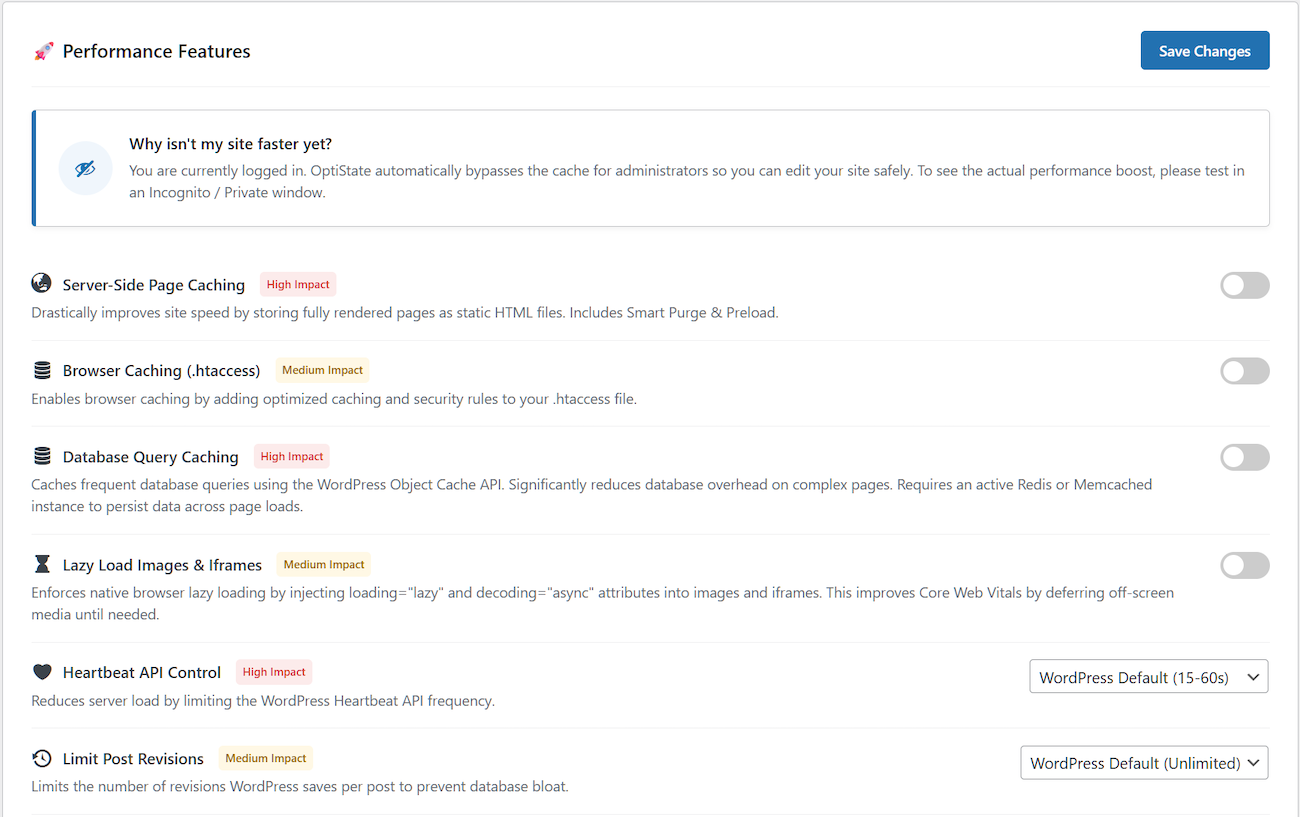
🎛️ Performance Features
– Bad bot blocker blocks resource‑hungry crawlers
– Font loading optimization eliminates render‑blocking fonts
– Lazy load images and iframes
– Heartbeat API control reduces server load by 60%+
– Post revisions limit (save 30‑50% database space)
– Trash auto‑empty after X days
– Disable XML‑RPC (block brute force attacks)
– Remove emoji scripts (save 12KB per page)
– Clean WordPress headers (hide version, RSD, WLW, shortlinks)
📊 Analytics & Monitoring
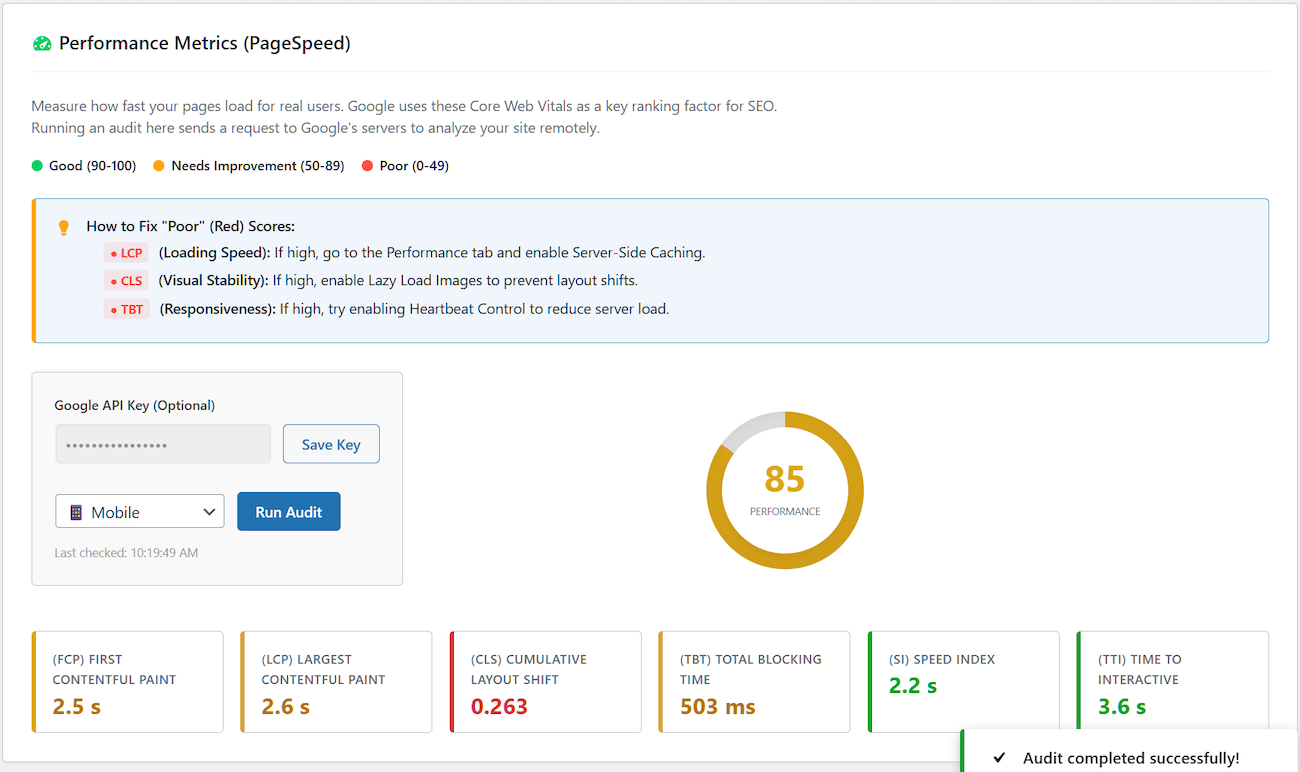
– PageSpeed Insights integration (Core Web Vitals)
– Performance metrics dashboard
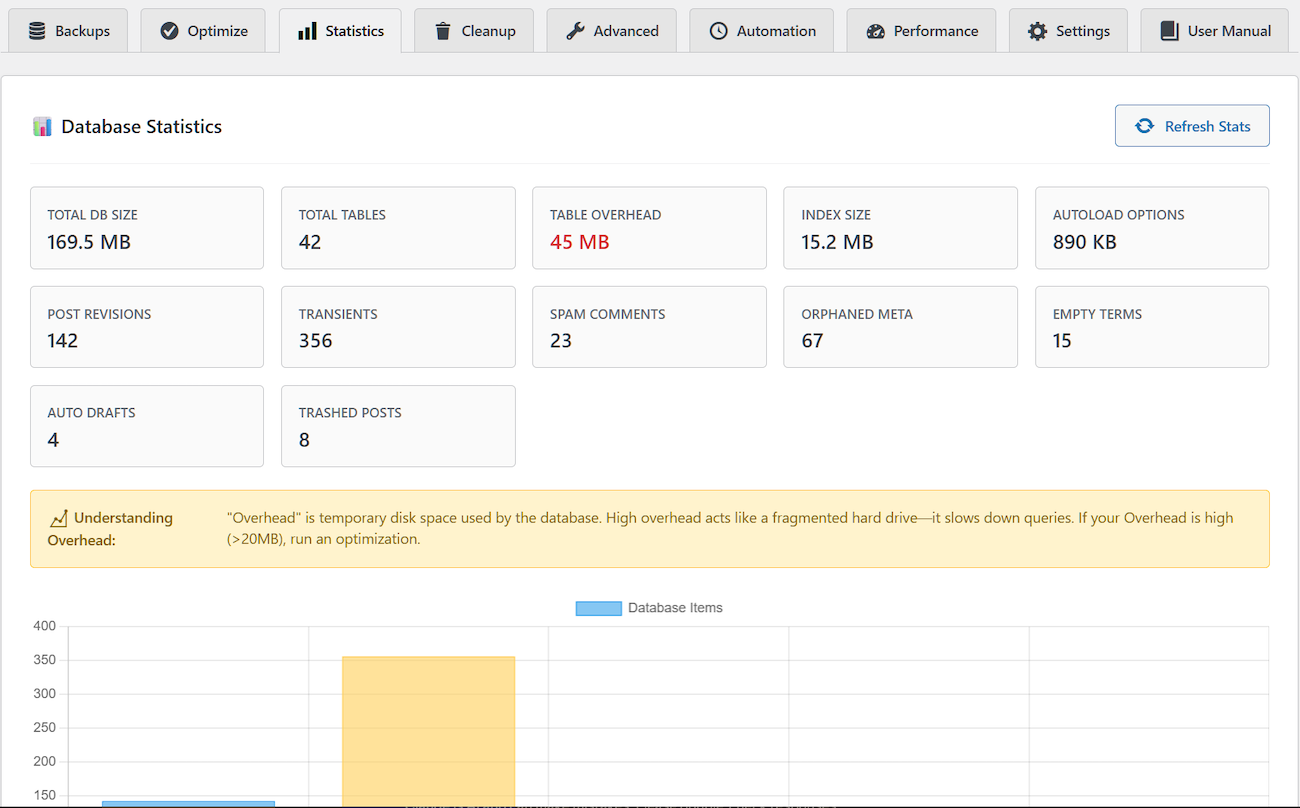
– Detailed database statistics
– Activity log (last 250 operations)
– Track optimization impact over time
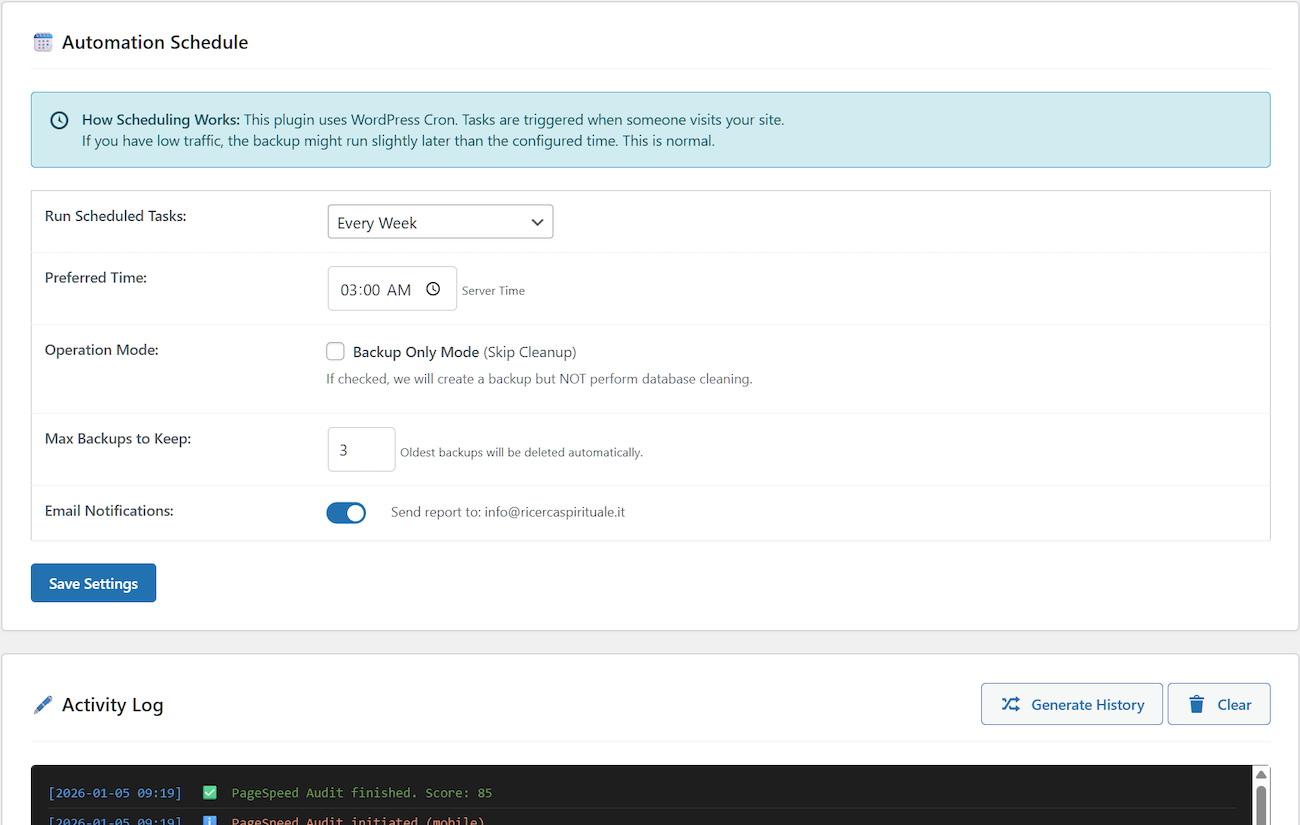
⏰ Automation
– Schedule daily, weekly, or monthly optimization
– Email notifications with detailed reports
– Custom time selection (run during low traffic)
– Combined backup + cleanup operations
🔒 Security
– Emergency rollback on restore failure
– Maintenance mode during critical operations
– Database validation before restore
– User access control (restrict plugin to specific admins)
– Settings export/import
– Brute force protection for login page
– IP number blocker (block entire site access)
– Two‑Factor Authentication (2FA)
Perfect For
🛒 E‑commerce Stores – WooCommerce session cleanup, Action Scheduler optimization, order transient removal, product index optimization
📝 High‑Traffic Blogs – Revision control, comment spam removal, transient cleanup, cache preload
🏢 Agencies & Developers – Staging/production migrations, bulk cleanup, settings export/import
🔒 Membership Sites – User metadata optimization, scheduled maintenance, login protection
🌐 Any WordPress Site – Slow admin, bloated database, poor performance, or security concerns
Replaces These Popular Plugins
- UpdraftPlus Backup & Restore
- WP Rocket Caching & Performance
- WP Super Cache Page Caching
- WP-Optimize Database Cleanup
- Better Search Replace Database Search & Replace
- Perfmatters Performance Optimization
- Heartbeat Control Heartbeat Management
- WP Revisions Control Revision Limits
- Clearfy Performance Tweaks
- Advanced Database Cleaner Deep Database Cleanup
- Autoptimize Performance Features
- Loginizer Login Page Protection
What Makes Optimal State Different?
Unlike WP-Optimize: We include professional backup/restore and advanced caching—not just basic cleanup.
Unlike UpdraftPlus: We optimize your database for performance, not just backup. Backups are 40-60% smaller due to optimization.
Unlike WP Rocket: We tackle the root cause (database bloat) instead of just caching around the problem. Combined approach = better results.
Unlike Perfmatters: We provide complete database management, automated backups, and intelligent cleanup—not just toggle switches.
Unlike Loginizer: We provide a user-friendly, straightforward control panel that requires no technical expertise.
The Optimal State Advantage: One plugin, one interface, one optimization strategy. No conflicts, no compatibility issues, no subscription fatigue.
Technical Specifications
- Minimum Requirements: WordPress 5.5+, PHP 7.4+
- Tested Up To: WordPress 7.0
- Server Compatibility: Shared hosting, VPS, dedicated, cloud (AWS, DigitalOcean, etc.)
- Hosting Compatibility: Bluehost, SiteGround, WP Engine, Kinsta, Cloudways, all major hosts
- Multisite: Not currently supported
- Database Support: MySQL 5.6+, MariaDB 10.1+
- Cache Support: Redis, Memcached, APCu compatible
External Services and Resources
Optimal State utilizes the following third-party services and open-source libraries to enhance functionality and user experience:
-
Google PageSpeed Insights API – Performance measurement tool that analyzes web page content and generates suggestions to make that page faster.
The plugin’s PageSpeed integration uses this API to fetch and display Core Web Vitals metrics and optimization opportunities.
When you use the PageSpeed feature, your site URL is sent to Google’s servers for analysis.
Use of this API is subject to Google’s Terms of Service and Privacy Policy.- API Documentation: https://developers.google.com/speed/docs/insights/v5/get-started
- Terms of Service: https://developers.google.com/terms
- Privacy Policy: https://policies.google.com/privacy
-
GTranslate Widget – Website translation service that provides automatic language translation functionality.
The plugin loads the GTranslate popup widget from cdn.gtranslate.net to enable multi-language support in the admin interface.
When the widget is loaded, it may connect to GTranslate’s servers to provide translation services.
Use of this service is subject to GTranslate’s Terms of Service and Privacy Policy.- Service Website: https://gtranslate.io/
- Terms of Service: https://gtranslate.io/terms-and-conditions
- Privacy Policy: https://gtranslate.io/privacy-policy
Note: The PageSpeed Insights feature is optional and only activates when you manually request a performance analysis. No data is sent to external services without your explicit action.
Credits
- Developed by Luke Garrison
- Icons by Dashicons (WordPress Core)
- Performance metrics based on Google PageSpeed Insights
Contributing: Interested in contributing to Optimal State? Feature requests, bug reports, and code contributions are welcome. Visit our support page for contribution guidelines.
Support and Documentation
Getting Help
- User Manual: Comprehensive documentation built into the plugin (user manual included)
- FAQ Section: Common questions answered in detail
- Live Demo: Interactive preview to explore features before installation
- Email Support: Priority support for Pro version users
Useful Links
Feature Requests
We actively develop Optimal State based on user feedback. If you have a feature request or enhancement idea, please contact us through the support page. Many current features were implemented based on user suggestions.
Capturas
Instalación
Automatic Installation (Recommended)
- Log into your WordPress dashboard
- Navigate to Plugins Add New
- Search for “Optimal State” or “optistate“
- Click “Install Now” on the Optimal State plugin card
- Click “Activate” after installation completes
- Access Optimal State from your WordPress admin menu
Manual Installation
- Download
optistate.zipfrom WordPress.org - Log into your WordPress dashboard
- Go to Plugins Add New Upload Plugin
- Choose the
optistate.zipfile - Click “Install Now” then “Activate“
- Access Optimal State from your admin menu
First-Time Setup
- Navigate to Optimal State in your admin menu
- Review the Dashboard to see your current database health score
- Check Statistics to identify optimization opportunities
- Create your first backup in the Backups tab
- Run One-Click Optimization from the Optimize tab
- Review the User Manual tab for detailed feature explanations
Preguntas frecuentes
-
Is Optimal State safe to use on production sites?
-
Yes. The plugin includes multiple safety mechanisms:
– Automatic safety backup before restore operations
– Emergency rollback if anything goes wrong
– Dry run mode for search & replace
– Zero‑downtime restore using temp table swap
– Database validation before restore
– Confirmation dialogs for destructive actions -
How does the emergency rollback work during a restore?
-
When you restore a backup, Optimal State first creates a safety backup of your current database. Then it uses a temporary table system: restored data goes into temporary tables first, validation is performed, and only after success are the tables atomically swapped (renamed) into place. If anything fails during the process – server crash, timeout, data corruption – the plugin automatically rolls back to the safety backup and puts your site back in maintenance‑free mode. This is handled by the
OPTISTATE_Restore_Enginewhich uses MySQL atomic rename operations to ensure zero data loss. Even if the restore fails mid‑way, your original tables remain untouched with anoptistate_old_prefix, ready for manual recovery. -
What happens if a restore process gets stuck or times out?
-
Optimal State uses a chunked restore system that processes large SQL files in manageable pieces. Each chunk runs within a set time limit and commits its changes. If a chunk times out, the system simply reschedules the next chunk to continue where it left off. The temporary table approach means that partial data never affects your live site. If the process gets completely stuck (e.g., server restarts), you can safely deactivate and reactivate the plugin – it will automatically detect the stalled restore and clean up any temporary tables. You’ll also see a “Restore stuck?” notice with clear instructions on how to abort safely.
-
What happens if a restore fails?
-
The system uses temporary table swap technology:
1. Data goes into temporary tables first
2. Validation check before going live
3. Atomic swap (old backup, temp live)
4. Emergency rollback if anything fails
5. Original tables remain untouched withoptistate_old_prefix -
Can the plugin handle very large databases?
-
Absolutely. Optimal State is built with large‑database scenarios in mind:
- Backups are created in chunks, not all at once, so memory limits are never exhausted. The system adapts batch sizes based on your server’s memory and execution time (
OPTISTATE_Backup_Engine::get_adaptive_batch_limit). - Restores are also chunked; each chunk processes a limited number of SQL statements and commits them, preventing timeouts. For very large files, decompression is performed in streaming mode, reading and writing in small blocks.
- Cleanups use batch deletes (e.g.,
DELETE ... LIMIT 2000) with transaction commits between batches, so they don’t lock tables for long periods. - The Process Store (
OPTISTATE_Process_Store) manages long‑running tasks using advisory locks and expiration, ensuring that background workers don’t collide and that stale jobs are cleaned up.
Databases up to several gigabytes are fully supported. For extremely large sites (10GB+), we recommend using the Pro version which includes additional optimizations for large‑scale operations.
- Backups are created in chunks, not all at once, so memory limits are never exhausted. The system adapts batch sizes based on your server’s memory and execution time (
-
Will this plugin conflict with my caching plugin?
-
Compatible: Redis/Memcached, Cloudflare, BunnyCDN
May conflict: WP Rocket, WP Super Cache, W3 Total Cache, Swift PerformanceIf you already use a caching plugin, simply disable Optimal State’s caching features (Server‑Side Page Caching and Browser Caching) and use it for database optimization, backups, and security features.
-
Does this work with WooCommerce?
-
Yes. Optimal State includes specialized WooCommerce optimization:
– Expired session cleanup (clean_woocommerce_bloatremoves expired sessions and transients)
– Action Scheduler log purging (removes completed, failed, canceled actions)
– Order transient removal
– Smart cache invalidation on order updates
– Product index optimization (Pro)Many WooCommerce stores see dramatic performance improvements after cleanup, especially if you have thousands of products or orders.
-
Can I migrate my site to a new domain with this?
-
Yes. Use the workflow:
1. Create backup on old site
2. Download the .sql.gz file
3. Install WordPress on new domain
4. Install Optimal State
5. Upload & restore the backup
6. Use Search & Replace to update URLs (it handles serialized data correctly)
7. Clear all cachesThe Search & Replace feature includes a “Dry Run” mode so you can preview all changes before applying them.
-
What data does the cleanup remove?
-
20 types including: post revisions, auto‑drafts, spam comments, trashed comments, trashed posts, orphaned postmeta, orphaned commentmeta, orphaned usermeta, orphaned term relationships, duplicate postmeta, duplicate commentmeta, pingbacks, trackbacks, expired transients, all transients, action scheduler logs, oEmbed cache, WooCommerce sessions, empty taxonomies, and WooCommerce bloat.
-
How much space can I save?
-
- New sites (<6 months): 5‑15%
- Medium sites (1‑3 years): 15‑35%
- Neglected sites (3+ years): 40‑70%
-
Does this work on managed WordPress hosting?
-
Yes, with some platform‑specific notes:
Full compatibility: SiteGround, Bluehost, HostGator, DreamHost, A2 Hosting, InMotion, most cPanel hosts
Database features only (disable page caching): WP Engine, Kinsta, Flywheel (use platform caching)
-
Optimal State’s server‑side caching automatically detects consent cookies from 20+ popular cookie plugins (CookieYes, Complianz, Cookie Notice, Borlabs, Real Cookie Banner, OneTrust, iubenda, etc.). Users with consent cookies see cached pages (fast). Users without consent cookies see fresh pages (privacy‑safe). You can also add custom consent cookie names if your site uses a less common solution. This is all handled by the
OPTISTATE_Server_Cachingclass, which parses cookie headers and checks against known patterns. -
Can I schedule automatic optimization?
-
Yes (Pro feature). You can schedule daily, weekly, or monthly optimization at any time (e.g., 2 AM). The system will create a backup, perform a full cleanup, and send you an email report. You can also choose “Backup Only” mode if you want to skip the cleanup part.
-
What is the Autoload Optimization feature and is it safe?
-
Autoloaded options are database entries that WordPress loads on every single page request. If these become too large (over 800KB), they significantly slow down your Time To First Byte (TTFB). Optimal State scans for large options that aren’t essential and safely changes their autoload setting to “no”. The feature automatically creates a backup of the original autoload status, so you can restore it instantly if anything breaks. The backup is stored in the
optistate_core_datatable and can be restored with a single click from the Advanced Tools panel. -
Does the plugin support Two‑Factor Authentication?
-
Yes. Optimal State includes full TOTP‑based 2FA (time‑based one‑time passwords) compatible with Google Authenticator, Authy, and other apps. Each user can enable it from their profile page. The system generates backup codes that can be used if you lose access to your authenticator app. This is handled by the
OPTISTATE_TwoFactorclass, which uses secure encryption for secrets and hash‑based verification for backup codes. -
How does the IP Number Blocker work?
-
The IP Blocker allows you to deny access to your entire site to specific IP addresses or CIDR ranges. Blocked IPs receive a 403 Forbidden response. You can block IPv4 and IPv6 addresses, as well as network ranges (e.g.,
192.168.1.0/24). The block list is stored in the database and enforced via PHP (not just .htaccess), so it works on any server environment, including Nginx. The plugin also prevents you from accidentally blocking your own IP by warning you if your current IP is in the list. -
Can I restrict plugin access to only certain administrators?
-
Yes. In the Settings tab, you can select which administrator accounts are allowed to use Optimal State. If no users are selected, all administrators have access. This is useful for agencies or large teams where you want to limit who can perform database‑sensitive operations. The access control is enforced on every admin page and AJAX request.
-
What support is available?
-
Free version: WordPress.org forums, built‑in user manual
Pro version: Priority email support, advanced troubleshooting, migration guidance -
Is my data sent to external servers?
-
No. All operations run locally on your server. The only exceptions are:
– PageSpeed Insights – Only when you manually click “Run Audit”, your site URL is sent to Google’s API. This never happens automatically.
– GTranslate widget – A translation widget loads from cdn.gtranslate.net to help non‑English speakers (cosmetic only, doesn’t affect functionality).No usage statistics, analytics, or telemetry are collected.
Reseñas


Colaboradores y desarrolladores
“Optimal State – Advanced Optimization, Performance & Security Suite” es un software de código abierto. Las siguientes personas han colaborado con este plugin.
Colaboradores
Traduce “Optimal State – Advanced Optimization, Performance & Security Suite” a tu idioma.
¿Interesado en el desarrollo?
Revise el código , eche un vistazo al repositorio SVN , o suscríbase al log de desarrollo por RSS .
Registro de cambios
1.4.1 – June 2026
- New security feature: Two-Factor Authentication (2FA).
- Added System Info section in the Dashboard tab.
- Added Trash (Recover Deleted Folders) to the Legacy Plugin Data Scanner tool.
- Added backup-and-restore capability to the Optimize Autoloaded Options tool.
- Implemented several improvements and refinements for improved efficiency and reliability.
1.4.0 – June 2026
- Implemented the ‘IP Number Blocker’ feature in addition to the ‘Login Page Protection’.
- Resolved a minor JavaScript issue affecting the save buttons.
- Added a new setting to the server-side caching feature (Minify HTML before caching).
- Improved the Query Caching feature for better performance and reliability.
- Removed configuration and logging files from uploads/optistate-settings/ folder and moved them to a dedicated database table.
- Increased the replacement speed of the Database Search & Replace tool.
- Slightly increased the database statistics load speed.
- Added more details to the One-Click Optimization interface.
1.3.3 – June 2026
- Main class “class-optistate.php” split into two additional classes.
- Toast notification system enhanced for better accessibility and readability.
- Added a “Refresh Items” button to the One-Click Optimization feature.
- Improved database backup and restore system compatibility, now covering 99.5% of websites.
- Enhanced memory management of the database restore process to minimize errors on low-performance servers.
- Adjusted some settings in the database cleanup functions for faster and more reliable operation.
- Updated XML-RPC Interface disabling to prevent error messages in the error log file.
- Database Query Caching system optimized for higher reliability and improved performance.
- Adjusted the “Optimize All Tables” feature to ensure maximum stability on slow servers as well.
- Various minor adjustments to ensure full security across all operations on all compatible WordPress and PHP versions.
1.3.2 – June 2026
- Optimal State becomes completely free starting on June 3, 2026.
- Enjoy full access to all the advanced features free of charge!
1.3.1 – June 2026
- Tested with WordPress 7.x for full compatibility.
- Tested on PHP 8.5 for full compatibility.
- Fixed a minor issue with date formatting.
- Fixed the vertical alignment of the dashicons inside the buttons.
- Fixed the “restore completed” admin notice displaying an incorrect elapsed time on some sites.
- Fixed autoloaded options size being undercounted on WordPress 6.6+ sites.
1.3.0 – March 2026
- Updated the server-side caching feature to improve the performance and reliability of the cache preloading and cache purging functionalities.
- Improved the reliability of the Legacy Plugin Data Scanner to minimize false positives.
- Added two performance features: Removal of 1. Feed Links (RSS & Atom) and 2. Post Relational Links.
- Powered up the Database Query Caching feature by adding two extra settings and optimizing how things work.
- Added validation of security headers via external link to the Browser Caching feature.
- Added several new recommendations to the Health Score Database tool.
- Added several new recommendations to the Performance Metrics (PageSpeed) tool.
- Implemented an additional security check in the database table deletion function within the Database Structure Analysis tool.
- Refined the Login Page Protection tool to increase its efficiency and reduce its impact on website performance.
- Completely redesigned the main plugin class (class-optistate.php), optimizing a dozen areas for greater efficiency and improved compatibility.
1.2.2 – February 2026
- The JavaScript code has been completely rewritten for better efficiency and reliability.
- Improved Legacy Plugin Data Scanner for deeper scanning.
- Expanded the database of plugins and themes detected by Legacy Plugin Data Scanner.
- Improved the scan depth of the Database Search & Replace functionality.
- Fixed a bug in the database statistics retrieval that caused an error when refreshing.
- Optimized the integration of Performance Metrics (PageSpeed) for faster and more accurate reporting.
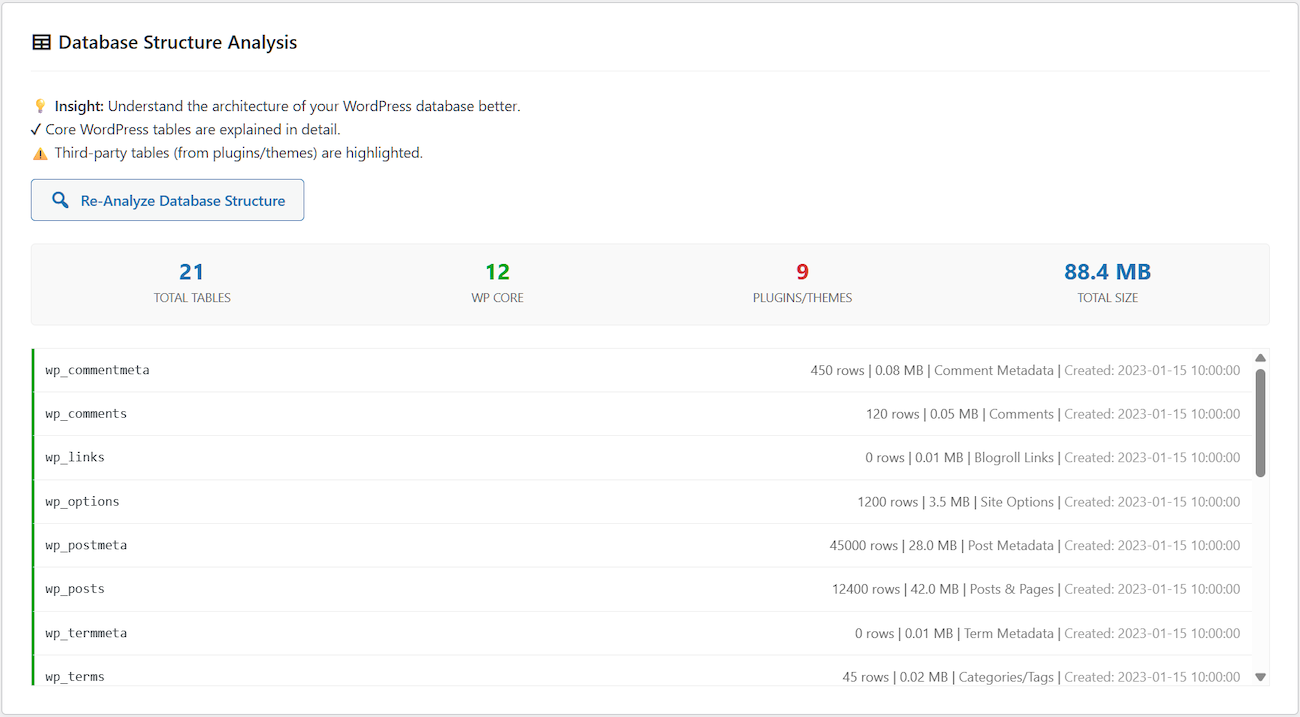
- Expanded the capabilities of the Database Structure Analysis tool, which now displays plugin/theme names alongside their corresponding database table names.
- The Bad Bot Blocker tool has been upgraded and now works perfectly and efficiently on Nginx servers as well.
- The Login Page Protection tool has been revised to increase its efficiency against massive brute force attacks, while still being completely reliable.
- The user manual has been updated, expanded, and is now more user-friendly.
1.2.1 – February 2026
New Feature: Legacy Plugin Data Scanner
* Detects data left behind by plugins/themes you have uninstalled
* Includes accurate security measures to avoid false positives
* The most powerful and comprehensive tool available in this category
Database Restore System Refinements:
* Full disabling on WordPress Multisite installations
* Enhanced efficiency of several core functions
* Increased protection against SQL injection vulnerabilities
* Added detailed how-to instructions for stuck restore processes
* Compatibility with phpMyAdmin exports increased to 100%
* Optimized server resource management to minimize errors and crashes
Security & Performance Improvements:
* Refined login page protection against brute force attacks
* Minimized memory and CPU waste during massive attack scenarios
* Improved security and behavior of cleanup operations related to:
– WooCommerce data
– Duplicate post meta
– Duplicate comment meta
Enhanced Analytics & Features:
* Improved accuracy of database statistics
* Enhanced efficiency of database queries for statistical retrieval
* Added new performance feature: Font Loading Optimization
* Improved efficiency and reliability of Bad Bot Blocker on Nginx servers
Documentation Updates:
* Expanded user manual with new sections
* Updated existing documentation for better user-friendliness
* Enhanced clarity for technical operations
1.2.0 – January 2026
- Modal Confirmations: Added user-friendly confirmation dialogs for all critical database operations including Create Backup, One-Click Optimization, Table Defragmentation, Repair Corrupted Tables, Optimize Autoloaded Data, and all cleanup operations (both detailed and targeted). Each modal displays operation-specific details and item counts to ensure informed decisions before execution.
- Print & Export: New functionality to print the manual or export it as a PDF for offline reference.
- Navigation Enhancements: Integrated a “Back to Top” smooth-scroll button and a detailed Table of Contents for easier navigation of technical sections.
- Persistent Tabs: The interface now uses sessionStorage in admin.js to remember your last active tab, ensuring you stay where you left off after a page refresh.
- Preview Branding: Updated the header section with new “Preview” and “Free Version” badges for better version clarity.
- Enhanced Modal Styling: Improved modal dialog appearance with better typography, spacing, and close button functionality for a more polished user experience.
- Expanded Sanitization: Updated optistate.php with more robust sanitization for cache settings, including specific handling for cache_lifetime and query_handling.
- Optimized Asset Loading: Modified admin.js to use passive scroll listeners, improving the responsiveness of the admin dashboard.
- Code Refactoring: Migrated inline CSS styles from admin-interface.php to admin.css to improve performance and code maintainability.
- Safety Features: All destructive operations now require explicit confirmation with clear warnings about permanent data deletion and backup recommendations where appropriate.
1.1.9 – January 2026
- Added comprehensive user manual with detailed feature explanations
- Expanded cleanup operations to 20 distinct types
- Improved performance metrics display with Core Web Vitals
- Enhanced toast notification system with detailed operation results
- Replaced remote Font Awesome dependency with local Dashicons for faster loading
- Localized Chart.js library to eliminate CDN dependency and improve privacy
- Optimized database query efficiency for faster health score calculations
- Fixed minor UI inconsistencies in mobile responsive design
- Updated security recommendations based on WordPress 6.9 best practices
1.1.8 – November 2025
- Added settings export/import functionality for configuration backup and migration
- Enhanced PageSpeed Insights integration with detailed Core Web Vitals breakdown
- Improved database structure analysis with index optimization recommendations
- Fixed edge case where cache statistics displayed incorrect numbers
- Updated security hardening recommendations for WordPress 6.8
- Optimized backup compression algorithm for 15-20% smaller file sizes
1.1.7 – October 2025
- Added specialized WooCommerce optimization targets (sessions, Action Scheduler, transients)
- Enhanced caching configuration with mobile-specific options and GDPR cookie support
- Improved automation scheduling interface with custom time selection
- Added comprehensive activity logging for all optimization operations (last 150 actions)
- Implemented smart cache invalidation on WooCommerce order updates
- Fixed compatibility issue with WooCommerce 8.5+ database structure
- Performance improvements in cleanup operation speed (30% faster)
1.1.6 – July 2025
- Core database optimization features: 14 cleanup types, table optimization
- Basic server-side and browser caching implementation
- Security hardening tools: XML-RPC disable, emoji removal, header cleanup
- Automated backup system with GZIP compression
- Health score algorithm and visual dashboard
- Performance features: lazy load, heartbeat control, revision limits