
Descripción
Includes a \”spoiler\” button and spoiler shortcode!
Use TinyMCE with bbPress is just what it sounds like – a scaled down version of the TinyMCE editor designed specifically for bbPress.
This plugin removes the Text editor and enables TinyMCE, allowing forum members to format their message in a way that\’s more intuitive and more closely resembles other forum software.
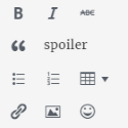
It includes buttons for:
- bold
- italic
- strikethrough
- blockquote
- spoiler button
- bulleted and numbered lists
- table support
- a bbPress-specific \”link\” button (see below)
- insert/edit image
- emoticons
- full screen
Note: the \”insert/edit\” link button in Use TinyMCE with bbPress is not the same button you\’re used to when it comes to editing posts and pages. It ONLY allows your forum users to include the link URL, text, title, and target. There are no options for linking to other internal posts or pages, as these options would most likely just confuse your members.
Use TinyMCE with bbPress is the forum editor I wish I\’d had when I first discovered bbPress.
Capturas

Buttons included: bold, italic, strikethrough, blockquote, spoiler, bulleted list, numbered list, add table, insert link, add image, emoticons, full screen 
The spoiler button inserts \”spoiler\” shortcode into the editor. 
Any text inside the spoiler shortcode will be hidden until the user clicks on the spoiler title.
Instalación
-
Unzip and then upload the \’bbp-tinymce\’ folder to the \’/wp-content/plugins/\’ directory
-
Activate the plugin through the \’Plugins\’ menu in WordPress.
That\’s it! Use TinyMCE with bbPress is ready to go!
Preguntas frecuentes
- Installation Instructions
-
-
Unzip and then upload the \’bbp-tinymce\’ folder to the \’/wp-content/plugins/\’ directory
-
Activate the plugin through the \’Plugins\’ menu in WordPress.
That\’s it! Use TinyMCE with bbPress is ready to go!
-

Colaboradores y desarrolladores
“Use TinyMCE with bbPress” es un software de código abierto. Las siguientes personas han colaborado con este plugin.
Colaboradores
Traduce “Use TinyMCE with bbPress” a tu idioma.
¿Interesado en el desarrollo?
Revise el código , eche un vistazo al repositorio SVN , o suscríbase al log de desarrollo por RSS .
Registro de cambios
1.0 – Initial release