

Descripción
Product Category helps you display WooCommerce product categories in a clean, customizable, and conversion-friendly way. Instead of sending visitors through a plain category list, you can build stylish category sections that guide shoppers toward the products they want faster.
Use it on landing pages, shop pages, homepages, blog posts, sidebars, and custom layouts. Whether you prefer the Block Editor, Elementor, SiteOrigin, or a simple shortcode, Product Category gives you a practical way to showcase selected categories with layout, typography, image, color, and pagination controls.
The plugin is built for store owners, designers, and developers who want more control over how WooCommerce categories appear without writing custom templates.
Compatible with:
- Shortcode for classic pages, posts, and custom content areas.
- Block Editor with a dedicated Gutenberg product category block.
- SiteOrigin Editor with a product category widget.
- Elementor with a product category widget.
The main strength of this plugin is its editor flexibility: choose your preferred workflow, select the categories you want to highlight, and adjust the display to match your store design.
Features
- Add a custom title above your product category listing.
- Select specific WooCommerce product categories to display.
- Choose from available category layout and style options.
- Control the number of categories shown per row and per section.
- Set category ordering by name or slug.
- Display categories in ascending or descending order.
- Show or hide product category descriptions.
- Enable or disable pagination for longer category lists.
- Show or hide category thumbnail images.
- Add image alt text support for better accessibility and SEO.
- Customize typography, including font size, font weight, font family, and letter spacing.
- Adjust colors and visual styles to match your WooCommerce store.
- Use the dedicated Elementor widget for live page-builder editing.
- Use the Gutenberg block to build category sections directly inside the Block Editor.
- Use shortcodes when you need a simple, editor-independent embed option.
Live Editing with Elementor and Block Editor
Product Category supports live editing through its own Elementor widget and Gutenberg block. You can select categories, adjust display settings, refine styles, and preview changes while you build the page.
Capturas
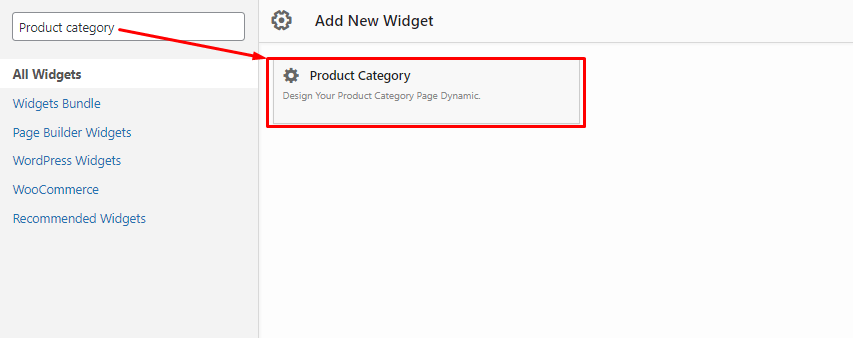
Product category widget for Siteorigin – Backend. 
Product category widget settings for Siteorigin – Backend. 
Product category widget for Elementor – Backend. 
Product category widget Content section in Elementor – Backend. 
Product category widget Style section in Elementor – Backend. 
Product category Front end Preview – Frontend. 
Product category Front end Preview – Frontend.
Blocks
This plugin provides 1 block.
- Product Category Block Manage your WooCommerce Product Category with this block.
Instalación
Two Way to install
First Way – Via FTP.
1. Download plugin file and unzip it.
2. In the extracted folder you will find product-category.zip file. Extract it.
3. Upload product-category folder into Plugins folder in your WordPress installation (/wp-content/plugins) using an FTP client.
4. Log into your WordPress admin panel and click on the Plugins tab.
5. Find installed plugin from the list and click Activate button.
Second Way – Via WordPress Dashboard.
1. Log into your WordPress admin panel and click on the Plugins tab.
2. Navigate to Add New > Upload
3. Click Choose File and select product-category.zip file on your computer.
4. Then hit Install Now and the plugin will be uploaded and installed.
5. Than click Activate button.
Reseñas


Colaboradores y desarrolladores
“Product Category” es un software de código abierto. Las siguientes personas han colaborado con este plugin.
Colaboradores
Traduce “Product Category” a tu idioma.
¿Interesado en el desarrollo?
Revise el código , eche un vistazo al repositorio SVN , o suscríbase al log de desarrollo por RSS .
Registro de cambios
1.5.3
Released June 01 – 2026
- Fix: Elementor & Shortcode columns responsive issue fixed.
- Fix: Product Category Block columns responsive issue fixed.
- Update: Moved frontend CSS files from the admin folder to the public folder.
- Update: Frontend styles now load only on the frontend, and admin styles now load only in the admin area.
1.5.2
Released May 29 – 2026
- Update: Renamed the About admin page callback for clearer function naming.
- Update: Improved About page content with more descriptive plugin details.
- Fix: Elementor shortcode render issue fixed.
- Update: Confirmed compatibility with WordPress 7.0.
1.5.1
Released December 11 – 2025
- Update: Bug fixed.
- Update: Code Optimized.
- Stable with WP 6.9
1.5.0
Released January 1 – 2025
- Update: Bug fixed.
- Update: Code Optimized.
- New: Introduced New Gutenberg Product Category Block.
- New: Documentation for adding New Gutenberg Product Category Block.
1.4.0
Released April 16 – 2023
- Update: Bug fixed.
- Update: Code Optimized.
- New: Added Show & Hide option for Category Thumbnail image using Shortcode.
- New: Added the “Alt tag” for your Category image.
1.3.1
Released April 07 – 2022
- Update: Bug fixed.
- Update: Added new block in documentation for
How to use Product category widget in elementor.
1.3
Released April 01 – 2022
- Update: Major bug fixed.
- New: Pagination option.
- New: Product Category widget for Elementor – Now, Customize your product category as you want with Elementor.
1.2
Released March 29 – 2022
- Update: tested upto wordpress latest version 5.9.2
1.1
Released Oct 18 – 2019
- New: Add shortcode (Compatibility with all editor using Shortcode)
- New: Add more features ex. Set column and row, Set order, Display specific id, etc
- Update: Plugins Core
1.0
Released Mar 02 – 2019
-
Fix some css and other bugs
-
Initial Release *