
Descripción
ReachZone is for local shops that deliver themselves: bakeries, florists, restaurants, grocers, flower and furniture stores. Set up where you deliver, and the plugin does the rest.
What it does
- Zones on a map. Unlimited locations, each with radius zones (km or miles), areas you draw on the map, or lists of postcodes (exact, prefix such as
606*, ranges such as60601-60610, UK outward codes and Canadian FSAs). - Per-zone rules. Delivery fee, minimum order, delivery time text and which WooCommerce shipping methods are allowed.
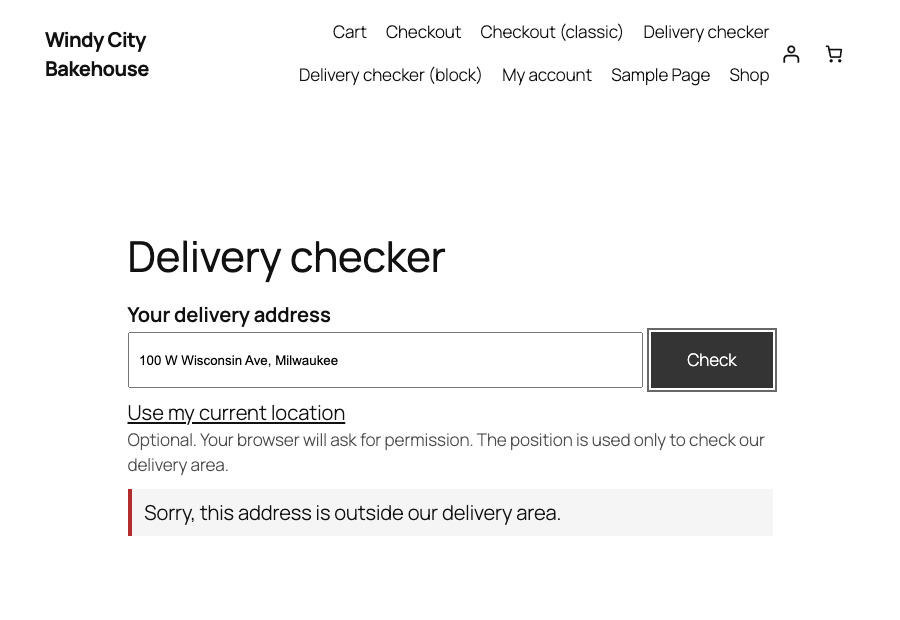
- Delivery checker. A block and a
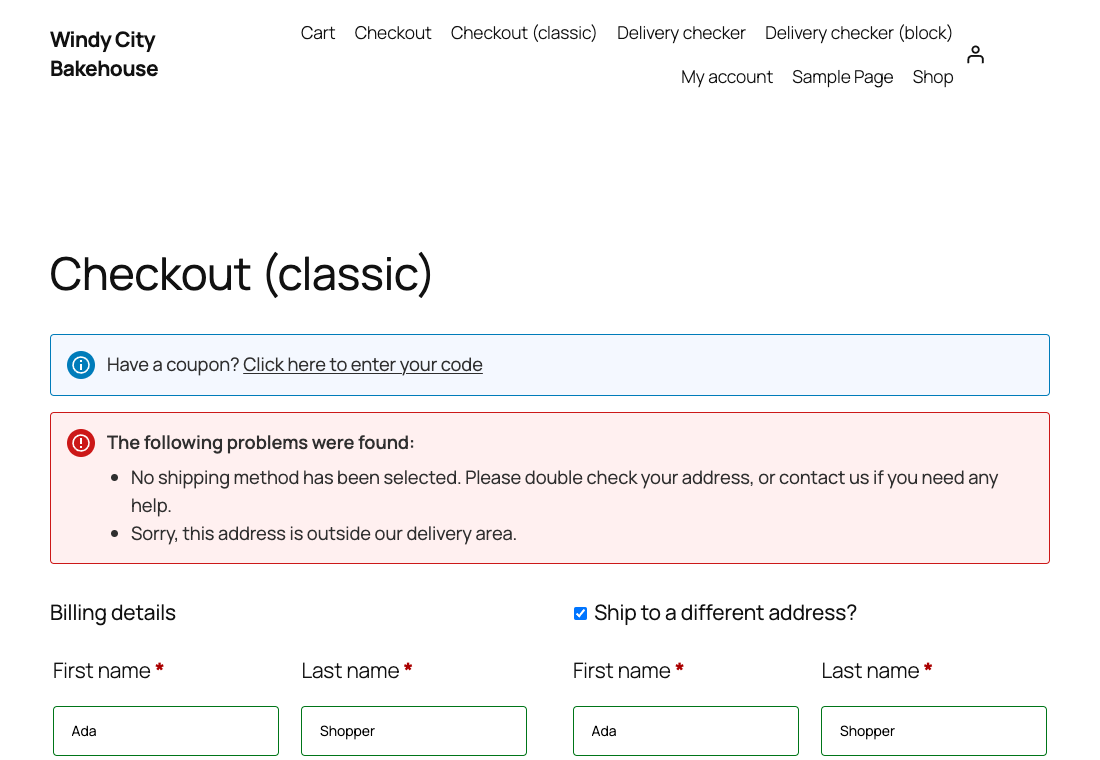
[reachzone_checker]shortcode. Shoppers see “We deliver here: 30 min, $4.99” or “Outside our delivery area” before they fill a cart. - Checkout rules. The matching zone filters shipping methods, adds its fee, enforces its minimum order, and blocks checkout outside every zone. Works with the classic checkout and the block checkout.
- Free: everything that runs in your shop. Unlimited locations, radius, drawn and postcode zones, the checker block and shortcode, and all the checkout rules. No account, no phone-home.
Paid plans (licence key): ReachZone API services
Paid plans add services that the ReachZone API provides. Nothing that runs inside your shop is locked.
- Pro: drive-time zones (for example “15 minutes by car”) built by the ReachZone API for one location, up to three zones, up to 15 minutes; and street-address lookup in the checker and at checkout (2,000 lookups a month).
- Business: drive-time zones for up to five locations with no limit on the number of zones, 10,000 address lookups a month, and an opt-in “unserved demand” map that shows where shoppers outside your area are (rounded positions only, no addresses).
- Agency: Business for ten sites, with 40,000 address lookups a month.
A drive-time zone that was built stays on your site and keeps working, and you can edit its label, fee, minimum order, delivery time and shipping methods or delete it, on any plan. Only building or rebuilding the area needs a licence.
Licence keys are checked by the ReachZone API (see “External services”). Plans and prices: https://reachzone.app/pricing (paid plans open soon; the free version works without a key).
How the free version checks an address without sending it anywhere
A street address cannot be turned into a map position without a geocoding service. The free version therefore never does that. Shoppers pass the check by sharing their browser location (they must click a button first), or by entering a postcode that one of your postcode zones covers. Shops that want street-address checking add a Pro (or higher) licence key, which switches on the ReachZone API (see “External services”).
Block checkout
Shipping-method filtering, fees and minimum orders work in the classic checkout. In the block checkout the plugin blocks the order through the Store API when the address is outside the zones. See the Frequently Asked Questions for the known limits.
External services
This plugin works without any external service on the free plan, apart from loading map tiles in the WooCommerce admin screens that show a map (see “Map tiles”).
ReachZone API (only when a licence key is entered)
When you enter a licence key in WooCommerce > ReachZone, the plugin sends requests to the ReachZone API at the address in the settings (default https://api.reachzone.app). The service is provided by ReachZone; terms of service: https://reachzone.app/terms and privacy policy: https://reachzone.app/privacy.
What is sent and when:
- Geocoding (
/v1/geocode): the address text and a two-letter country code. Sent when a shopper uses the address field in the delivery checker, when a shopper’s shipping address is checked at checkout, and when you press “Find on map” for your own shop address in the settings. - Licence check (
/v1/license/activate,/v1/license/status,/v1/license/deactivate): your licence key and this shop’s web address. The service stores the web address only as a keyed hash, to count how many sites use a key. Sent when you save a key, again at most twice a day by a background task, and once (best effort) when the plugin is uninstalled. If the service cannot be reached the plugin keeps the last answer for 7 days and then behaves like the free plan. - Drive-time areas (
/v1/isochrone): the latitude and longitude of your shop, the minutes and the travel mode. Sent once when you save a drive-time zone; the result is stored on your site. - Unserved-demand map (
/v1/demand/events,/v1/demand/cells; Business and Agency plans, opt-in, off by default): only when you have a Business or Agency key and tick “Unserved-demand map” in WooCommerce > ReachZone. When a shopper’s lookup falls outside every delivery zone (in the checker, or at checkout), your site stores the position rounded to about 100 metres, the date and whether it came from the “checker” or the “checkout”. A background task sends up to 500 of these entries per hour to the service and then deletes them from your site; entries that could not be sent are deleted after 7 days. What is sent: the rounded latitude and longitude, the date and the source, nothing else (no address, postcode, IP address, name, shopper identifier or order). The service keeps the entries for 180 days and uses them only to draw your map and count your monthly quota. When you open WooCommerce > Unserved demand, your server fetches the map’s cells and total from the service (/v1/demand/cells) and shows them. Turning the option off, or losing the plan, stops sending and empties the queue on your site. Terms of service: https://reachzone.app/terms and privacy policy: https://reachzone.app/privacy. - Every request carries your licence key in a request header so the service can authorise it. The plugin never sends the shopper’s name, email, IP address or order.
Who handles the data behind the API. The ReachZone API runs on a server operated by Hetzner Online GmbH in Helsinki, Finland (EU). Requests reach it through Cloudflare’s network, which delivers and protects it. To answer geocoding and drive-time requests, the API passes the address text and country code, or the shop’s position, minutes and travel mode, to the map-data provider Geoapify (KEPTAGO LTD, Cyprus) on its EU servers; Geoapify keeps request logs for no more than 24 hours. Geoapify terms: https://www.geoapify.com/terms-and-conditions/ and privacy policy: https://www.geoapify.com/privacy-policy/. Cloudflare privacy policy: https://www.cloudflare.com/privacypolicy/.
ReachZone does not store the address text. It keeps a keyed hash of the address with the position found for 90 days, separately for each licence, so repeat lookups are answered without asking Geoapify again. All data for a licence is deleted within 30 days after the licence ends. For shopper data the shop is the controller and ReachZone acts as its processor, under the data processing terms: https://reachzone.app/dpa.
Nothing is sent to the API without a licence key, and demand data only after you switch the opt-in on. There is no analytics, tracking or update ping in this plugin.
Map tiles (settings screen and unserved-demand screen only)
The zone editor and the unserved-demand heat map in the WordPress admin show a map. The map background comes from the ReachZone tile service at https://tiles.reachzone.app (map data from OpenStreetMap, served as a Protomaps basemap, hosted on Cloudflare). The map drawing code is bundled with the plugin; nothing is loaded from a CDN.
What is sent and when: only while a logged-in administrator has one of those two screens open, the browser requests map tiles from the tile service. A request contains the tile coordinates (zoom, column and row, which show roughly which part of the world is on screen), and, as with any web request, the administrator’s IP address and the browser’s standard headers such as the address of the admin page (referrer) and user agent. Neither the plugin nor ReachZone adds cookies or identifiers, and no shop data, address, order or licence key is sent. ReachZone does not log or analyse these requests; Cloudflare, which hosts the tile service, processes them as part of its normal operation (for example for caching and abuse protection).
The delivery checker and the checkout shoppers see do not load a map and make no tile request.
You can change the tile address under WooCommerce > ReachZone > Map tiles, for example to your own raster tile server (an address with {z}, {x} and {y}). Then your browser contacts that server instead and its terms apply. Terms of service: https://reachzone.app/terms and privacy policy: https://reachzone.app/privacy. Cloudflare privacy policy: https://www.cloudflare.com/privacypolicy/. Map data credit: (c) OpenStreetMap contributors, https://www.openstreetmap.org/copyright; basemap by Protomaps, https://protomaps.com.
Privacy
- Shopper addresses are never stored by the plugin. For licensed shops the plugin keeps, in the shopper’s own WooCommerce session, the coordinates of the position that was found and a keyed hash of the address (to avoid repeat lookups).
- When a shopper uses “Use my current location”, the position is rounded to about 10 metres and kept in the WooCommerce session for the checkout check.
- The free plan sends no shopper data anywhere. With a licence key, the address a shopper types and its country are sent to the ReachZone API to find its position (see “External services”); never the shopper’s name, email, IP address or order.
- The optional unserved-demand map (Business and Agency plans, off by default) leaves your shop: out-of-area lookups are stored on your site as coordinates rounded to about 100 metres, a timestamp and the source (“checker” or “checkout”), and sent hourly to the ReachZone API, only while the setting is on. No address, postcode, IP address or user is stored or sent. Your site deletes entries once they are sent (or after 7 days); the ReachZone service keeps them for 180 days.
- The public checker endpoint keeps a short-lived counter per visitor (a keyed hash of the IP address) for ten minutes to limit abuse.
- All data is removed when you delete the plugin.
Suggested text for your privacy policy (free plan): “We check the address or postcode you enter, or the location you choose to share, against our delivery area on our own website. The delivery checker does not store the address.”
With a licence key, add: “To check a street address, we send the address and its country (never your name, email or order) to ReachZone, our delivery-area provider, which finds its position on the map with its map-data provider Geoapify in the EU. ReachZone keeps only a scrambled form of the address and the position found, for up to 90 days.”
If you turn on the unserved-demand map, also add: “If your address is outside our delivery area, we send ReachZone its position rounded to about 100 metres and the date, so we can see where to deliver next. ReachZone keeps these for 180 days.”
ReachZone’s data processing terms for shops on a paid plan: https://reachzone.app/dpa.
Third-party libraries
Bundled in assets/vendor/, not loaded from any CDN. Licences in assets/vendor/LICENSES.txt.
- Leaflet 1.9.4 (BSD-2-Clause): https://leafletjs.com, source https://github.com/Leaflet/Leaflet
- Leaflet.draw 1.0.4 (MIT): https://github.com/Leaflet/Leaflet.draw
- Leaflet.heat 0.2.0 (BSD-2-Clause) with simpleheat (ISC): https://github.com/Leaflet/Leaflet.heat, https://github.com/mourner/simpleheat
The JavaScript files in this plugin are not minified or built, except leaflet-heat.js, whose source is at the link above.
Capturas


Bloques
Este complemento ofrece 1 bloque. .
- Delivery checker Lets shoppers check whether you deliver to their address, postcode or location.
Instalación
- Install and activate WooCommerce, then this plugin.
- Go to WooCommerce > ReachZone, add your shop location (click the map) and at least one zone.
- Add the “Delivery checker” block to a page, or put
[reachzone_checker]on it. - Under WooCommerce > Settings > Shipping make sure your delivery methods exist. Tick the ones each zone may use.
Preguntas frecuentes
-
Does it work without a licence key?
-
Yes: unlimited locations with radius, drawn and postcode zones, the checker and all the checkout rules. Only the ReachZone API services need a licence key: drive-time zones and street-address lookups. Street addresses cannot be located without a licence key, so shoppers pass by sharing their location or by a postcode your postcode zone covers.
-
What happens at checkout for an address the plugin cannot place?
-
By default checkout is blocked with a message that asks the shopper to use the delivery checker first. You can choose to allow such orders instead.
-
Does the block checkout work?
-
Out-of-zone orders are blocked and the Store API rejects them. Fee and minimum order are applied through the cart, and shipping methods are filtered in the same way as in classic checkout. The delivery option shows the zone’s delivery time, for example “Delivery (30 min)”. The unserved-demand map (Business and Agency plans, opt-in) is fed from the block checkout too, once per shopper and rounded spot per hour.
-
Can I use OpenStreetMap tiles?
-
The plugin does not use the public OpenStreetMap tile servers, whose usage policy does not allow this kind of use. It draws a vector basemap built from OpenStreetMap data and served by the ReachZone tile service. If you prefer your own tile server, enter its raster address under Map tiles in the settings and keep the attribution your provider asks for.
Reseñas
No hay opiniones sobre este complemento.
Colaboradores y desarrolladores
“ReachZone – Delivery Zones & Checker for WooCommerce” es un software de código abierto. Las siguientes personas han colaborado con este plugin.
Colaboradores
Traduce “ReachZone – Delivery Zones & Checker for WooCommerce” a tu idioma.
¿Interesado en el desarrollo?
Revise el código , eche un vistazo al repositorio SVN , o suscríbase al log de desarrollo por RSS .
Registro de cambios
0.1.1
- A dismissible request for a review on the settings screen, 7 days after your first zone.
- Readme tags updated.
0.1.0
- First release.